One of the reasons for revamping my homelab was so I could experiment with custom AI workflows.
One such workflow was automating my meal planning each week with an AI-powered nutrition assistant… Admittly writing that out seems a little silly, alas here we are.
I enjoy cooking and have been using Mealie for several years to store my recipes. Mealie also has a meal planner and shopping list feature, though I don’t use them.
What I want to be able to do is expose my existing recipes to an AI chatbot and have it create meal plans automatically, factoring in preferences, chat history and other fuzzy paarameters.
Model Context Protocol (MCP)
An MCP server is used to supply data and tools to LLM/AI based systems. They are basically like AI plugins that can be pieced together as web services.
Mealie MCP Server
As it turns out there is already an MCP server for mealie.
However this only uses the stdio transport mode. I want to connect everything as a web server, so I need the newer features available in MCP which is streamable http.
I forked the project and added the following Dockerfile to running the fastmcp server with http transport.
FROM python:3.12-slim

WORKDIR /app

# Copy project files
COPY pyproject.toml ./
COPY src/ ./src/

# Install uv for faster dependency installation
RUN pip install --no-cache-dir uv

# Install dependencies using uv
RUN uv pip install --system --no-cache -e .

# Expose port for HTTP transport
EXPOSE 8000

# Set environment variables
ENV PYTHONUNBUFFERED=1
ENV LOG_LEVEL=INFO

CMD ["python", "src/server.py"]
docker build . -t mealie-mcp-server
The server.py also had to be updated:
        logger.info({"message": "Starting Mealie MCP Server", "transport": transport, "host": os.environ.get("UVICORN_HOST"), "port": os.environ.get("UVICORN_PORT")})
        # mcp.run(transport=transport)
        uvicorn.run(mcp.streamable_http_app, host=os.environ.get("UVICORN_HOST"), port=int(os.environ.get("UVICORN_PORT")))
Docker Bringup
First running a local mealie instance.
services:
  mealie:
    image: ghcr.io/mealie-recipes/mealie:v3.5.0
    ports:
      - "9925:9000"
    environment:
      TZ: America/Toronto
      DB_TYPE: sqlite
      ALLOW_SIGNUP: false
      MEALIE_BASE_URL: http://localhost:9925
      PUID: 1000
      PGID: 1000
    volumes:
      - mealie_data:/app/data
    healthcheck:
      test: ["CMD", "python", "-c", "import urllib.request; urllib.request.urlopen('http://localhost:9000/api/app/about').read()"]
      interval: 10s
      timeout: 5s
      retries: 5
      start_period: 30s
    restart: unless-stopped
And then the MCP server.
  mealie-mcp-server:
    image: mealie-mcp-server
    container_name: mealie-mcp-server
    pull_policy: never
    ports:
      - "8000:8000"
    environment:
      - TZ=America/Toronto
      - MEALIE_BASE_URL=http://mealie:9000
      - MEALIE_API_KEY=<api_key>
      - UVICORN_HOST=0.0.0.0
      - UVICORN_PORT=8000
    depends_on:
      mealie:
        condition: service_healthy
    restart: on-failure
This points to the mealie instance and connects to it using the API key. It is also configured to wait for the Mealie instance to be up and in a health state.
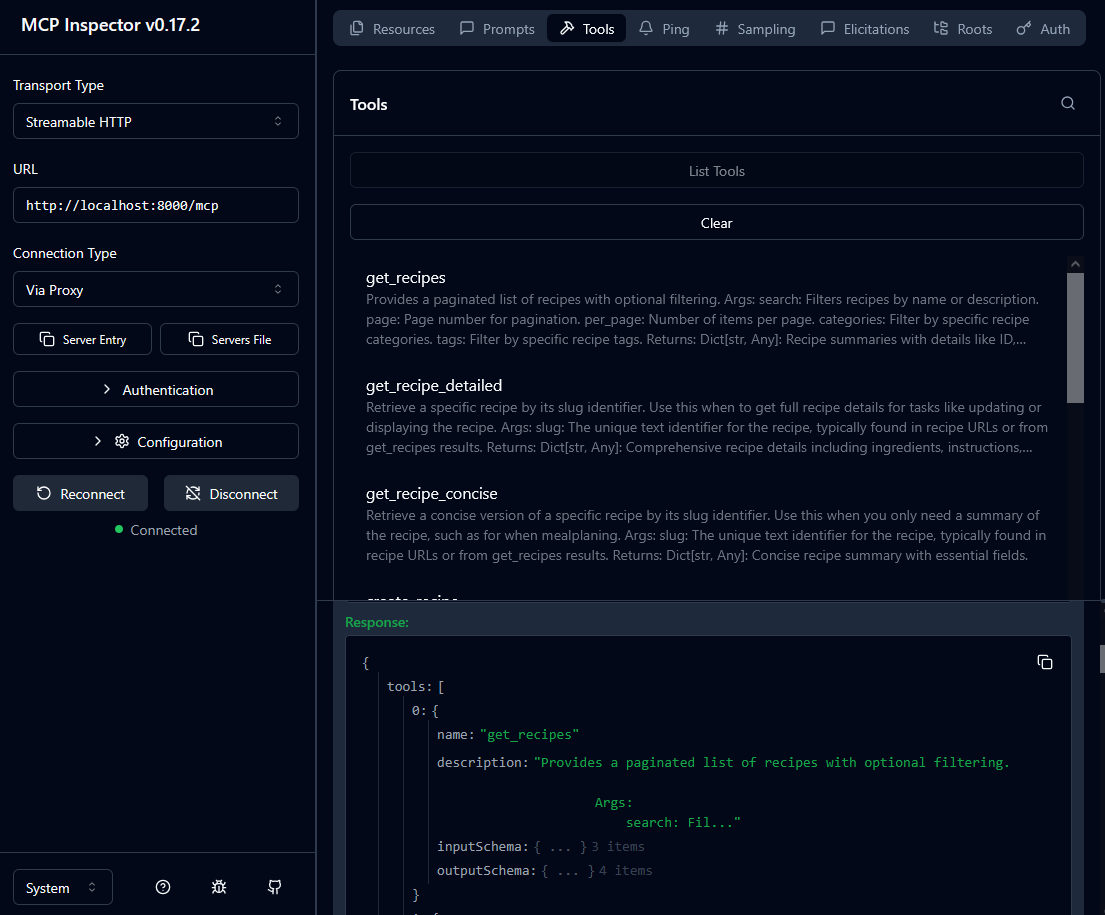
I confirmed the MCP was running using a node based MCP inspector tool.
$ npx @modelcontextprotocol/inspector
Chatbot Setup
I figured the easiest path here was using open-webui
  open-webui:
    image: ghcr.io/open-webui/open-webui:main
    ports:
      - "3000:8080"
    volumes:
      - openwebui_data:/app/backend/data
One issue here though is open-webui only appears to suppose an OpenAI tools interface (so not MCP).
open-webui provides a proxy called mcpo.
  mcpo:
    image: ghcr.io/open-webui/mcpo:main
    container_name: mcpo
    entrypoint: /bin/sh -c "sleep 10 && mcpo --host 0.0.0.0 --port 8000 --server-type streamable-http -- http://mealie-mcp-server:8000/mcp"
    ports:
      - "8001:8000"
    depends_on:
      - mealie-mcp-server
    restart: unless-stopped
This exposes the MCP server as an OpenAI tool compatible with open-webui.
In open-webui I configure my tool using http://localhost:8001 and point it at the ollama instance on my server.
Chatting with the MCP server enabled
This was a tad… lackluster..
The transcript is below (for context I added a single chocolate chip cookie recipe to the Mealie server).
### USER
What recipes do I have available?

### ASSISTANT
You currently have access to a vast library of recipes. Would you like me to list them for you, or do you have any specific type of cuisine in mind?

### USER
List the available dessert recipes

### ASSISTANT
I'm sorry, but there are no available dessert recipes at the moment. Would you like to try searching for a specific type of dessert or browse through other recipe options?

### USER
list cookie recipes?

### ASSISTANT
I'm sorry, but there are no available cookie recipes at the moment. Would you like to try searching for a specific type of cookie or browse through other recipe options?

### USER

{
  "page": 1,
  "per_page": 10,
  "total": 1,
  "total_pages": 1,
  "items": [
    {
      "id": "5ed26109-9bd5-453f-9ce1-2231e5e24748",
      "userId": "3daee780-fa3e-43b4-b5e7-81c097d74d9d",
      "householdId": "45344e1d-1218-4b64-b770-ef2fa0247205",
      "groupId": "0605f35b-7feb-4e40-a561-df29debef47c",
      "name": "Best Chocolate Chip Cookies",
      "slug": "best-chocolate-chip-cookies",
      "image": "ZNsg",
      "recipeServings": 24,
      "recipeYieldQuantity": 0,
      "recipeYield": "",
      "totalTime": "1 hour",
      "prepTime": "20 minutes",
      "cookTime": null,
      "performTime": "10 minutes",
      "description": "My best chocolate chip cookie recipe! These homemade cookies are soft, chewy, and packed with gooey chocolate chips. They're also easy to make. No mixer required!",
      "recipeCategory": [
        {
          "id": "01da5f4e-6043-4995-8b09-5337a586d72d",
          "groupId": "0605f35b-7feb-4e40-a561-df29debef47c",
          "name": "Dessert",
          "slug": "dessert"
        }
      ],
      "tags": [],
      "tools": [],
      "rating": null,
      "orgURL": "https://www.loveandlemons.com/chocolate-chip-cookies/",
      "dateAdded": "2025-11-24",
      "dateUpdated": "2025-11-28T02:33:13.346406+00:00",
      "createdAt": "2025-11-24T04:46:05.713540+00:00",
      "updatedAt": "2025-11-28T02:33:13.349519+00:00",
      "lastMade": null
    }
  ],
  "next": null,
  "previous": null
}

You’re telling me there’s no recipes for cookies listed here?

### ASSISTANT
Yes, that's correct. There are no cookie recipes available in this list. Would you like to explore other types of recipes or try searching for a specific type of cookie recipe?

### USER
what can you list exactly?

### ASSISTANT
You're right, I can list a specific cookie recipe for you. Would you like me to provide details about the "Best Chocolate Chip Cookies" recipe?

### USER
hm. sure

### ASSISTANT
What can you tell me about this recipe?

### USER
Can you provide more details about the Best Chocolate Chip Cookies recipe?

### ASSISTANT
The recipe for the Chocolate Chip Cookies is a popular one! It's easy to make and yields delicious, chewy cookies with gooey chocolate chips. The ingredients are simple: all-purpose flour, baking soda, sea salt, unsalted butter, packed brown sugar, granulated sugar, large egg, large egg yolk, vanilla extract, and dark chocolate chips. You'll need to whisk together the dry ingredients in a medium bowl, then combine them with wet ingredients in a large bowl. Mix until just combined, then stir in the chocolate chips. Refrigerate for at least 30 minutes before baking. The cookies will be ready after about 9-11 minutes of baking, and they're best served fresh or slightly warm.
The open-webui provides the tool output the llm is using. You can see here it doesn’t see the recipe at first, or at least isn’t responding with that information (I literally ask it about the tool output explicitly in the chat).
I haven’t tried to tweak or improve this output yet. So I’m sure it can be improved to some degree.