I personally dislike developing and compiling code on a raspberry pi. Especially given typical ROS workflows where you are going to derisk a bunch of stuff in sim first and deploy your application. At work we have our build pipelines that get the code to the robot in a timely mananer. From the hobbyist robot perspective, I’m not running a build farm, spitting ISOs images as build artifacts or have auto update worflows.
I want to have a way to achieve CI/CD on my personal ROS robot endeavours.
The simpliest way to do this seems to be deploying the ROS environment using Docker.
Why use Docker
There are several advantages to deploying the ROS environment with docker.
- Clean host. No ROS on the host means you don’t have to handle upgrades, downgrades or package breakages
- Deploying a whole custom workspace
- Easy upgrades via docker pull
The main downside I can think of is that mapping hardware devices might get tricky but so far this has not been a problem.
Building the Docker image
The docker file is pretty staightforward. The main steps are:
- install the usual system dependecies like git, pip, etc.
- Install additional ros packages in a workspace as needed
- Install dependencies via rosdep
- Build the workspace
- Setup environment
- Setup entrypoint
# syntax=docker/dockerfile:1-labs
ARG ROS_DISTRO=jazzy

FROM ros:${ROS_DISTRO}

ENV DEBIAN_FRONTEND=noninteractive

RUN apt-get update && apt-get install -y --no-install-recommends \
    python3-pip \
    git \
    python3-vcstool \
    python3-rosdep \
    build-essential \
    nano \
    && rm -rf /var/lib/apt/lists/*

# Clone external dependencies (cached unless this layer changes)
RUN mkdir -p /ros_ws/src \
    && cd /ros_ws/src \
    && git clone https://github.com/nnarain/create_robot.git \
    && git clone https://github.com/nnarain/libcreate.git \
    && git clone https://github.com/nnarain/teleop_twist_joy.git --branch ds4-config

# Copy only package.xml files first so the rosdep layer is cached unless dependencies change
RUN mkdir -p /ros_ws/src/genbu_robot
COPY --parents */package.xml /ros_ws/src/genbu_robot/

RUN if [ ! -f /etc/ros/rosdep/sources.list.d/20-default.list ]; then rosdep init; fi \
    && rosdep update \
    && apt-get update \
    && cd /ros_ws \
    && rosdep install --from-paths src --ignore-src -r -y \
    && rm -rf /var/lib/apt/lists/*

# Copy the full source and build (this layer re-runs on source changes)
COPY . /ros_ws/src/genbu_robot

RUN rm -rf /ros_ws/build /ros_ws/install /ros_ws/log \
    /ros_ws/src/genbu_robot/build /ros_ws/src/genbu_robot/install /ros_ws/src/genbu_robot/log

RUN cd /ros_ws \
    && . /opt/ros/${ROS_DISTRO}/setup.sh \
    && colcon build --cmake-args -DCMAKE_BUILD_TYPE=Release


# Set up ROS environment
RUN echo "source /opt/ros/${ROS_DISTRO}/setup.bash" >> ~/.bashrc
RUN echo "source /ros_ws/install/setup.bash" >> ~/.bashrc

# Set working directory
WORKDIR /ros_ws

CMD ["/bin/bash", "-lc", "source /opt/ros/${ROS_DISTRO}/setup.bash && export COLCON_CURRENT_PREFIX=/ros_ws/install && source /ros_ws/install/setup.bash && ros2 launch genbu_bringup robot.launch.xml"]
Build and Deploy with Github Actions
This is pretty much using stock github actions to build the docker container and push to GitHub Container Registry.
name: Build and Push Docker Images

on:
  push:
    branches:
      - develop
  workflow_dispatch:

env:
  REGISTRY: ghcr.io
  IMAGE_NAME: $

jobs:
  build:
    runs-on: ubuntu-latest
    permissions:
      contents: read
      packages: write
    strategy:
      matrix:
        ros_distro: [jazzy]

    steps:
      - name: Checkout repository
        uses: actions/checkout@v4

      - name: Set up QEMU
        uses: docker/setup-qemu-action@v3

      - name: Set up Docker Buildx
        uses: docker/setup-buildx-action@v3

      - name: Log in to Container Registry
        uses: docker/login-action@v3
        with:
          registry: $
          username: $
          password: $

      - name: Extract metadata
        id: meta
        uses: docker/metadata-action@v5
        with:
          images: $/$
          tags: |
            type=raw,value=latest
            type=raw,value=$
            type=raw,value=$-

      - name: Build and push Docker image
        uses: docker/build-push-action@v5
        with:
          context: .
          file: ./docker/Dockerfile
          platforms: linux/amd64,linux/arm64
          push: $
          tags: $
          labels: $
          build-args: |
            ROS_DISTRO=$
          cache-from: type=gha
          cache-to: type=gha,mode=max
Starting the Docker container on the robot
To start the docker container on the robot, using a debian package to install a systemd service that starts docker (this assumes docker is already on the host).
#!/usr/bin/env bash
set -euo pipefail

GENBU_IMAGE="${GENBU_IMAGE:-ghcr.io/nnarain/genbu_robot:latest}"
GENBU_CONTAINER_NAME="${GENBU_CONTAINER_NAME:-genbu-robot}"
GENBU_DOCKER_PULL="${GENBU_DOCKER_PULL:-always}"
GENBU_DOCKER_NETWORK="${GENBU_DOCKER_NETWORK:-host}"
GENBU_DOCKER_PRIVILEGED="${GENBU_DOCKER_PRIVILEGED:-true}"
GENBU_DOCKER_DEVICE="${GENBU_DOCKER_DEVICE:-/dev/ttyUSB0}"
GENBU_DOCKER_JOYSTICK="${GENBU_DOCKER_JOYSTICK:-/dev/input/js0}"
GENBU_DOCKER_EXTRA_ARG="${GENBU_DOCKER_EXTRA_ARG:-}"

if [[ "${GENBU_DOCKER_PULL}" == "always" ]]; then
  docker pull "${GENBU_IMAGE}"
fi

if docker ps -a --format '' | grep -Fxq "${GENBU_CONTAINER_NAME}"; then
  docker rm -f "${GENBU_CONTAINER_NAME}"
fi

docker_args=(
  --rm
  --name "${GENBU_CONTAINER_NAME}"
  --network "${GENBU_DOCKER_NETWORK}"
)

if [[ "${GENBU_DOCKER_PRIVILEGED}" == "true" ]]; then
  docker_args+=(--privileged)
fi

if [[ -n "${GENBU_DOCKER_DEVICE}" ]]; then
  docker_args+=(--device "${GENBU_DOCKER_DEVICE}:${GENBU_DOCKER_DEVICE}")
fi

if [[ -n "${GENBU_DOCKER_JOYSTICK}" ]] && [[ -e "${GENBU_DOCKER_JOYSTICK}" ]]; then
  docker_args+=(--device "${GENBU_DOCKER_JOYSTICK}:${GENBU_DOCKER_JOYSTICK}")
fi

if [[ -n "${GENBU_DOCKER_EXTRA_ARG}" ]]; then
  docker_args+=("${GENBU_DOCKER_EXTRA_ARG}")
fi

exec docker run "${docker_args[@]}" "${GENBU_IMAGE}"
This also sets up the device mappings for the serial device to the iRobot base and the gamepad.
The following is the output of the systemd service.
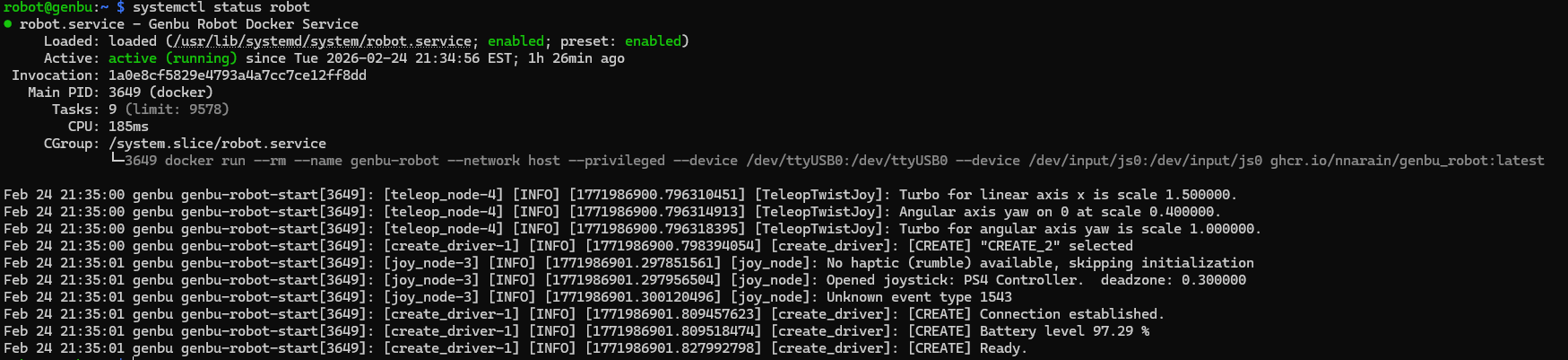
With that both the base driver and the joystick teleop is enabled so the robot can startup and drive!