You can see in a previous post, you can see that as the robot is mapping the map is turning in a weird way and not aligning with the robot movement.
There was a few issues at play here, all pretty minor in nature. The following is the fixes.
Map not updating
First off the map wasn’t really updating in the system. I found that slam toolbox wasn’t publishing the robot’s pose. While the robot was publishing scan and odometry the slam tool box’s Karto model was rejecting scan data because it didn’t have the correct number of range readings.
LaserRangeScan contains 459 range readings, expected 478
It’s funny not having a system with many diagnostics. So it’s not really apparent from foxglove that this is an issue. But you can see it in the /rosout.
Apparently the Karto model always expect the same number of readings for every scan message and the yd lidar driver was emitting scans with varying data.
The solution here was to use the existing fixed_resolution parameter in the driver.
Another minor issue in slam toolbox was the queue size for scan data was fixed at one. I increaed this to 10.
Issues with TF
The ydlidar was also publishing it now /tf transforms. And the robot state publisher has a static transform from base_link to the laser link.
I disable the transform from the ydlidar.
Orientation
The main issue that I have having was the robot was not oriented in the map correctly. This ultimately was just an incorrect rotation in the URDF. But it show that there was this difference in the rviz viewable model and the on robot orientation.
I had copilot create this script that was useful to visualize the orientation of the scan data with respect to the robot (using bag data).
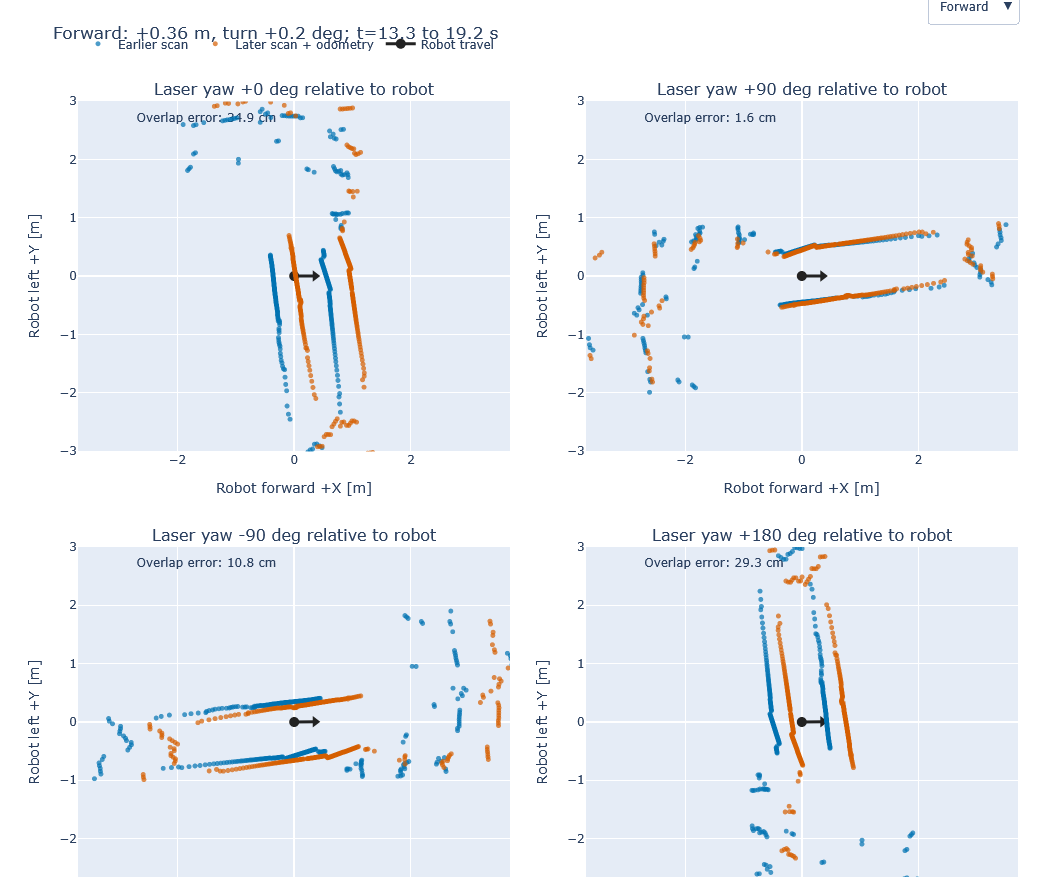
The robot is sitting in a hallway at the end that is closest to my living room. So the script simply visualizing all the orientations makes it really easy to see which one is correct.
Improved mapping below