Ok been a bit since I’ve done an update on the robot project. Well I’ve had a series of issues but hopefully have a line of sight on getting things going again.
Where I last left off, I thought I’d be in a position to get the nav2 stack on the real robot going. However it turns out the universe had other plans.
Lidar Bringup Stability issues
Ok so the first issue I had was with the RPLidar at start up. The RPLidar was powered off the USB port on the raspberry pi. Convenient sure. But that means the USB port has to drive the motor in the unit. I’ve had issues with this on spinning disk HDDs. Soo. ya. I don’t think the spinning lidar was fairing much better. What I was seeing was restarting, due to what I assume were brownouts in the raspberry pi.
So the obvious thing to do here is to split the power supply for the raspberry pi and the lidar.
Power supply split and Battery Bypass
I made a splitter and used two bucks for different 5V sources. I also set things up for the system (atleast the pi and lidar) to be powered off a 12V DC adaptor.
Now, where I screwed up is the D-Link powered hub I had was a 5V in 5V out. So no internal regulation. I didn’t read the voltage input on the side of the hub. So I plugged 12V into it directly. This consequently killed the serial adaptor for the RP Lidar…
Luckily I have a YD Lidar sitting in a box.
So now we have this:
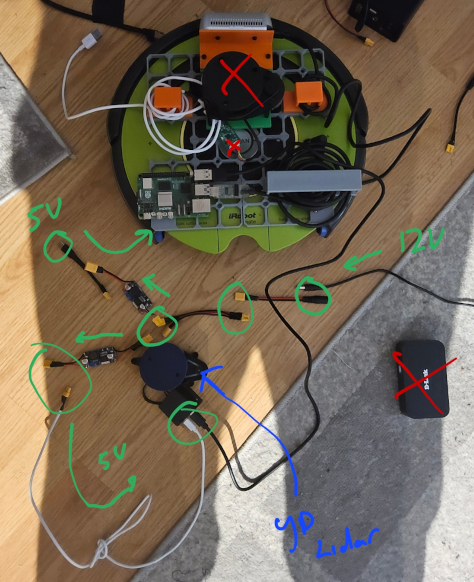
So all good right? Well…
Buck issues
Now I have this box of buck converters I’ve been using for a while. But to be honest I didn’t check what current they are rated for.
I started having issues with the start up of my raspberry pi 5, with the lidar disconnected. If I started ROS on the robot, it starting browning out.
Now as it turns out there bucks are rated for 3A. The raspberry pi 5, is very particular with it’s power requirements. So that’s not going to the cut it.
Ok, so solution. By a 5V @ 5A buck oonverter. Easy.
Well…
Pi Power Issues
Now apparently regardless of the buck, the pi as not powering on with the official Pi power supply or my laptops USB-C charger.
So I think I borked the USB-C PD input on the raspberry pi.
Luckily… I have an Raspberry Pi 4. So I put the SD card from the Pi 5 into the Pi 4.
So good to go now? Well…
Serial cable issues
How I got here I’m not really sure. But I did. So that’s nice.
My serial cable for my iRobot Create 2, stopped appearing on the raspberry pi. It wasn’t enumerating on my pi or on my laptop. This thing is just a USB-Serial converter. I assume the same event that broke the USB-C power, might have also killed the usb dongle that was connected to the robot.
The dongle portion of the cable has a breakout
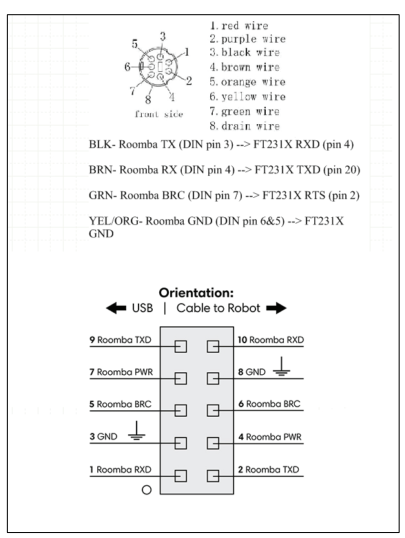
So the USB portion can be bypassed.
I confirmed that I could, in fact, connect to the Create 2 base still. If I used the Raspberry Pi’s hardware serial port.
So a bit of good news there.
Next steps
Ok so new bucks, need to use a powered hub, some new cables to route.
The plan is:
- expand the e-bay in the robot so I have space for the new bucks and hub
- Mount everything cleanly again
Then hopefully I should be able to reliably bring up the Nav2 stack on the actual robot.