For the last week or two I’ve been playing around with Hermes agent on my home server. I’m going to give a little update on what I’m doing with it.
What is Hermes?
Hermes is a self hostable agent you can run on your home setup. It can talk to many different model / providers.
I originally (and have tested) running it using local inference on my homelab, however I just don’t find the setup that reliable yet. So I’m opting for the payed service. I’ve been using deepseek-v4-flash token, which is fractions of a cent per token and so far seem pretty capable.
Ideally I’d be using local inference and deligating to a more powerful model, but I don’t realistically think that is happening at any point in the future.
My AI Usage So Far
So like everyone else I’ve been using a lot of AI tools in my daily life and work. I think the vast majority of what I’ve used it for so far is research and building ideas.
What I’ve found particularly useful has been connecting my obsidian vault to claude code and letting it read/write my notes.
This works fairly well but there’s a couple gaps. The main one being the mobile app doesn’t have access to my obisidian vault the same way the desktop version does. This can actually be pretty annoying, especially when trying to continune the same session on different environments.
In the same vain, I could add some MCP servers to claude desktop, but then the mobile app would be less and less useful.
Reason to use Hermes
The idea here was if I setup hermes I can run it on my home server and give it access to the files and tools that I want it to have.
The rough setup
I have hermes installed on it’s own vm. This seems to have been the best move because it give hermes a whole evironment to mess around in and I didn’t want to mess around with it in a container at the moment. And I definitively didn’t want it running on my main apps vm.
Hermes has access to my obisidian via NFS mount the same way my other vms do.
What I want
So as I say, I going a lot of research. I’ve build a lot of notes in my vault. It’s builds a shared / persistent context across sessions. And I’m spending time doing this for weeks to months on a particular topic.
So I converge on an idea. And now there’s a phase where I want to make a prototype. The idea is I want to hand it to an agent to get the foundation of the concept in place.
I want to track this in my current task management system.
So effectiveluy I want:
Notes -> Task -> Code
How I’m doing it
My TODO app I’ve been using is: Vikunja Previously I’ve use Gitea, I opted for Forgejo on the new server.
Vikunja setup
services:
  vikunja:
    image: vikunja/vikunja
    environment:
      VIKUNJA_SERVICE_PUBLICURL: http://vikunja.home.lan
      VIKUNJA_DATABASE_HOST: db
      VIKUNJA_DATABASE_PASSWORD: changeme
      VIKUNJA_DATABASE_TYPE: postgres
      VIKUNJA_DATABASE_USER: vikunja
      VIKUNJA_DATABASE_DATABASE: vikunja
      VIKUNJA_SERVICE_JWTSECRET: ...
    ports:
      - 3456:3456
    volumes:
      - /srv/homelab/docker/vikunja/files:/app/vikunja/files
    depends_on:
      db:
        condition: service_healthy
    restart: unless-stopped

  db:
    image: postgres:18
    environment:
      POSTGRES_PASSWORD: changeme
      POSTGRES_USER: vikunja
    volumes:
      - /srv/homelab/docker/vikunja/db:/var/lib/postgresql
    restart: unless-stopped
    healthcheck:
      test: ["CMD-SHELL", "pg_isready -h localhost -U $$POSTGRES_USER"]
      interval: 2s
      start_period: 30s

  vikunja-mcp:
    build: .
    image: vikunja-mcp:local
    container_name: vikunja-mcp
    restart: unless-stopped
    environment:
      VIKUNJA_URL: http://192.168.1.2:3456/api/v2
      VIKUNJA_API_TOKEN: ${VIKUNJA_API_TOKEN}
    ports:
      - "8926:8926"
There is no official Vikunja MCP server. So there’s a small script the docker stack is building and using
"""Serve altiplano (Vikunja MCP) over Streamable HTTP — launcher for container use."""
from altiplano import prompts  # noqa: F401  (registers the guidance prompt)
from altiplano.tools import (  # noqa: F401  (import side effect registers tools)
    assignees, comments, kanban, labels, projects, relations, tasks,
)
from altiplano.app import mcp

if __name__ == "__main__":
    mcp.run(
        transport="streamable-http",
        host="0.0.0.0",
        port=8926,
        streamable_http_path="/mcp",
    )
The MCP server is added to the hermes config with the auth token
mcp_servers:
  ...
  vikunja:
    url: http://192.168.1.2:8926/mcp
    headers:
      Authorization: Bearer ...
Forgejo Setup
services:
  server:
    image: codeberg.org/forgejo/forgejo:16
    container_name: forgejo
    environment:
      - USER_UID=1000
      - USER_GID=1000
      - FORGEJO__server__ROOT_URL=https://forgejo.home.lan/
      - FORGEJO__server__PROTOCOL=http
      - FORGEJO__server__DOMAIN=forgejo.home.lan
      - FORGEJO__server__SSH_DOMAIN=forgejo.home.lan
      - FORGEJO__server__SSH_PORT=222
      - FORGEJO__repository__ROOT=/data/git/repositories
      - FORGEJO__lfs__PATH=/data/lfs
      - FORGEJO__webhook__ALLOWED_HOST_LIST=private
    restart: always
    volumes:
      - /srv/homelab/docker/forgejo:/data                                         # local VM volume →>
      - /mnt/storage/homelab/docker/forgejo/repositories:/data/git/repositories   # NAS → git repos
      - /mnt/storage/homelab/docker/forgejo/lfs:/data/lfs                         # NAS -> lfs
      - /etc/localtime:/etc/localtime:ro
    ports:
      - "3000:3000"
      - "222:22"


  forgejo-mcp:
    image: git.b4mad.industries/agentic-forges/forgejo-mcp:v2.34.1
    container_name: forgejo-mcp
    restart: unless-stopped
    command:
      - --transport
      - http
      - --url
      - http://192.168.1.2:3000
      - --http-port
      - "8080"
    ports:
      - "9080:8080"
    environment:
      # Intentionally no FORGEJO_ACCESS_TOKEN — multi-tenant per-request auth.
      - FORGEJO_USER_AGENT=forgejo-mcp/2.34.1
I config it to put repos on the NAS bulk storage and enable webhooks (I’ll talk about that later).
And forgejo is added to the mcp servers
mcp_servers:
  forgejo:
    url: http://192.168.1.2:9080/mcp
    headers:
      Authorization: Bearer ...
Now at first I thought this would be more webhook driven. But it feels the more reliable way was just to poll with cron, so I did go through the trouble of setting up n8n and some webhook endpoints but they are unused.
Forgejo User and Repo Setup
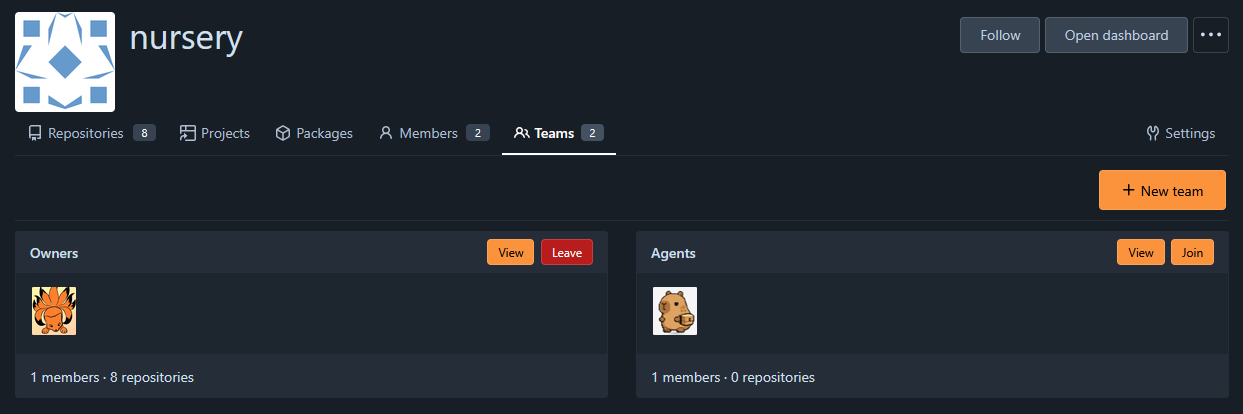
So a few things here.
- There is a hermes-bot user that I created, to restrict access
- The bot can also access the nursery org, for prototypes
- Each org has teams, so there is an Agents team
The Agent Setup
Beyond this point it’s just me asking hermes to creates tasks. They move into the Forgejo environment via a cron script. Then another script polls the repos that hermes-bot can access and looks for issues can are assigned to the bot. It picks up the tasks then does then.
What’s nice about all of this is the the agent as full access to all the notes from the vault, so it has more to go off of then just the context in the ticket.
Another idea I have here is that when I’m done with a prototype, there is this closing workflow to summarise the project and extract the value of it.
I would probably write that idea up in more detail, but I haven’t gotten to that stage a lot yet.
General opinions on agentic code
My main thought here is just I’m using this to research and then spawn functional prototypes / toy examples, I can play with. The idea is it continue and learn about the ideas I’m building. The boilerplate around making something work is probably less important then the code logic. The closing workflow is intended to sort of summarise the core value, then when/if I actually get to integrating this into an actual project I have more context to work off of and get put more care into the actual design.
Results
In general, I’m finding this to be pretty useful. Ultimately I’d like to stream line the progress. There’s definitively some stuff the agent does I look at like “ya that could be code” or “ya that should be it’s own docker container”.
The next steps will be to integrate VS Code with the Hermes agent so it has the addition context for turning the prototypes into real projects.